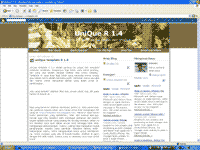
with 3 columns
and the sidebar had the colour also the high of sidebar always was the same as the column
( column for postimg).
To promised his request, I made in accordance with hisrequest.
this is the screenshot of this template :
- Had three columns that is Main column and two sidebar column.
- Sidebar had the colour be different from main column.
- The height of sidebar background colour always be the same as main column.
- The sidebar background color was easy to change with your.
This template is on XML format (new blogger template). If there is one of you interested in the HTML format (Classic template),
please write your request in the comments box, then later i'm will be made it and all that was free.
The little note for you that more liked sidebar column was on the left, you could change
the position sidebar to was on the left, his step like this:
- Login in blogger with your id.
- Click Layout.
- Click Edit HTML.
- Look for the code like this :
#main-wrapper {
width: 467px;
float: left;
margin:0px 7px 0px 0px;
word-wrap: break-word; /* fix for long text breaking sidebar float in IE */
overflow: hidden; /* fix for long non-text content breaking IE sidebar float */
}
#sidebar-wrapper {
width: 400px;
float: right;
margin:0;
padding: 7px;
background:$sidebarbgcolor;
word-wrap: break-word; /* fix for long text breaking sidebar float in IE */
overflow: hidden; /* fix for long non-text content breaking IE sidebar float */
}
- You only just changed the code float: right; to float: left; ,
also was the reverse, so as the code to like this:
#main-wrapper {
width: 467px;
float: right;
margin:0px 7px 0px 0px;
word-wrap: break-word; /* fix for long text breaking sidebar float in IE */
overflow: hidden; /* fix for long non-text content breaking IE sidebar float */
}
#sidebar-wrapper {
width: 400px;
float: left;
margin:0;
padding: 7px;
background:$sidebarbgcolor;
word-wrap: break-word; /* fix for long text breaking sidebar float in IE */
overflow: hidden; /* fix for long non-text content breaking IE sidebar float */
}
- Click Save Template button.
- Finish.
Please see results, now sidebar column located on the left and main column was on the right.
The other note that is, the data for download was in the
zip fail, so as before you uploading
this template to blogger, you must extract with winzip software.
The last note, this template is free to download, but you
don't delete credits link to my blog.
to download, please click the link below :
Enjoy your new face !